The product selection at Fred Meyer includes a variety of items that will cover many of your daily needs, and thanks to a few tips, you can stock up on the ones you need without paying the full price. Fred Meyer offers a wide variety of groceries, cleaning and household items, electronics, personal care and beauty products, pet supplies, as well as vitamins and supplements.
Advertisement:
Besides the retailer’s weekly ads that can help you save when getting the products of interest, digital coupons are another great way for your savings to add up when shopping at Fred Meyer. If you’re new to couponing at this retailer, here are a few tips to help you make the most of your next purchases by using digital coupons.
Getting Started
To benefit from the many regularly-available digital coupons at Fred Meyer, you will need to create an account online, and have a valid Plus Card or an Alternate ID. Digital coupons are like paper coupons, but they’re loaded directly to your Shopper’s Card and are automatically deducted when you purchase qualifying products.
When trying to clip a digital coupon on the retailer’s website, you will be required to sign in to be able to do that. Therefore, if you already have a digital account, sign in. Once you’ve signed in, you can link your Shopper’s Card by going to the “Profile Information” section and selecting the “Edit” option under the “Shopper’s Card Number.”
In case you don’t have an account, you can create one by providing the required information. This step also requires you to link your Rewards Card Number or Alt ID Number if you want to access digital coupons, track your savings, check your fuel points, and benefit from other such advantages. If you don’t have a card, Fred Meyer will create a virtual one for you at the time of your registration.
If you often shop online and even when on the go, the Fred Meyer app might be of interest as it was designed to simplify your shopping experience and help you have all the latest offers and account information readily available.
In case you already have a digital account, just sign in after you’ve downloaded and installed the app and add your Shoppers’ Card. You can even create such a card within the app. This card is required if you want to download digital coupons and benefit from other offers while using the app. Plus, in order to redeem digital coupons and earn fuel points, you can easily scan the app at checkout.
How to View, Load, and Redeem Digital Coupons
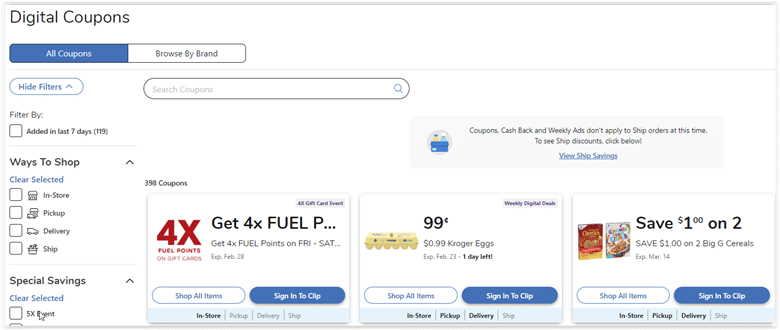
Once you’ve created a digital account and signed in, go to “Save” in the main navigation and you will see a section dedicated entirely to digital coupons where all the coupons available for loading are displayed.
Advertisement:
To load the coupons of interest onto your Shoppers’ Card, just click the “Load to Card” button on the offers of choice. The coupons added to your card should be available for use immediately. However, network or connectivity issues might interfere with this process. If the coupons don’t load because of poor connectivity, try again at a later time when it is stable.
After you’ve loaded the digital coupons you want to redeem, purchase the products of interest online or in-store. If you shop in-store, you will have to scan your Shopper’s Card or enter your Alt ID at the register. The discount will be automatically deducted from your purchase, and it should be visible underneath the qualifying product. Check your receipt to make sure everything went well. You should see “ecpn” for the digital coupons you’ve used.
In case you want to remove a coupon you’ve loaded onto your card, you can do that from the “Digital Coupons” section. Just click the “My Coupons” tab and then select the “Remove from Card” option that is available at the bottom of each coupon.
Digital Coupon Limits
Digital coupons can help you save significantly when stocking up on your needs, but there are a few rules to follow and a few restrictions that apply. Make sure that you read the Fred Meyer coupon policy for more on terms and restrictions.
For example, you can load 150 coupons per household at a time. Some coupons are valid for a longer time, and when loading them, they can count as more than one coupon. To know more about the expiration date of a coupon, check its full description as the expiration date should be mentioned on every coupon.
However, when a digital coupon is expired, it will be moved to the “Expired coupons” section that you can view on the “My Coupons” page and will no longer be active on your card. Expired and redeemed coupons are excluded from the maximum amount of coupons that you can load onto your card.
Save With Fred Meyer Special Digital Savings Events
Besides the retailer’s weekly deals and digital coupons, you can also save during the special digital savings events it hosts. An example of such an event was available at the time of writing, with the retailer letting customers clip digital coupons and use them up to five times in one transaction to save on their favorite participating items.
The website features a section dedicated to such events, and when there’s one live, you should see the digital coupons included in the promotion in this section. You can get all the details regarding a coupon by opening the offer of interest and clicking the “more details” option. The retailer also mentions the date of such an event so that you can take advantage of the available deals before it’s too late.
What’s great is that such events typically feature digital coupons that apply to select items from every product category at Fred Meyer. The event we’ve mentioned above included digital coupons for groceries, cleaning & household items, and health & personal care items, to name a few.
Advertisement:
The wide variety of items included in such promotions makes it more likely for you to find something that meets your needs, therefore, it is worth keeping an eye on such events and the digital coupon section at Fred Meyer.