It would seem that nowadays for every new Facebook user, there are a lot others choosing to delete their accounts.
Some users simply get to that point where all the bombardment and all the activity become overwhelming and counterproductive to a better quality of life.
If you too have had enough and feel like taking a break from social media, you can deactivate and then go back to your account at a later time.
Advertisement:
Or you can opt to remove your profile from Facebook database permanently, in which case all the information associated with the account will be deleted and you won’t be able to access it again.
Here is how to deactivate your FB account.
When you deactivate, your profile will disappear from the social network. Friends won’t be able to see or contact you, and your likes, comments, and posts are removed, but only until you reactivate and log in to your account again.
Messages and other information, however, may still be visible to others during the deactivation period.
To deactivate from desktop:
- Go to the top right of the FB page and click on the drop-down menu.
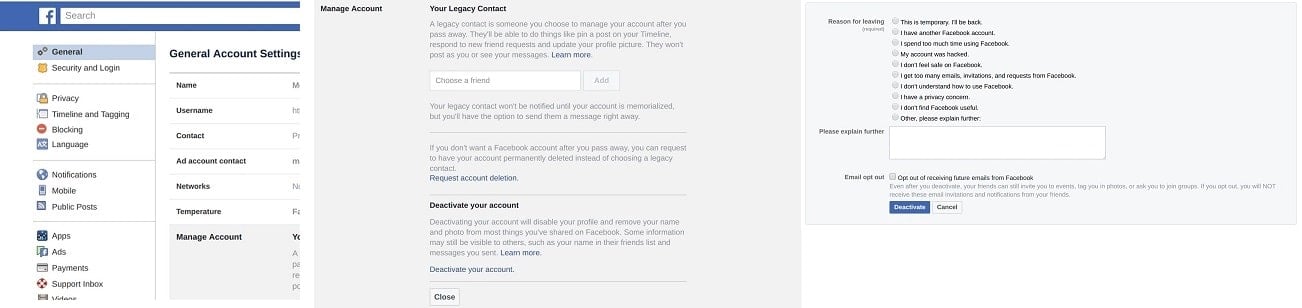
- Select Settings, then click General on the left and in the Manage Account section, choose to deactivate your account at the bottom of the list.
- Select the reason for leaving and click the Deactivate button to proceed with the process.
Advertisement:
Deactivating from your smartphone is similar. You go to Settings®Account Settings®Security to select the link that says Account – Deactivate.
Here is how to remove the account permanently.
When you choose to delete permanently, all the information associated with the account will be erased from the database and you will not be able to access it at all after that.
So you may want to choose the deactivating option first to get a feel of being without Facebook before you actually proceed to remove the account permanently.
If you’ve decided you want to avoid Facebook at all costs and are sure about deleting, here is how to do it:
- First, if you would like a copy of your activity on Facebook – photos, posts, messages, chat conversations etc., you can download your archive by going to Settings and then General. Here you will find a link that says Download a copy of your Facebook data. Click to start the download.
The data may take up to several hours to download depending on how much information you have stored in your account.
- Then you may want to remove any linked accounts to prevent accidental logins into Facebook after requesting deletion.
You will find these by going to Settings and clicking on the Apps link at the bottom of the list.
- Now all you have to do is access the Delete The easiest way is to Google ‘delete Facebook account’ while logged in. This will take you directly to the Delete link.
- Next you will be asked to fill in the password for confirmation of your account.
- Then simply click OK.
Note that you will still be able to log in for a short amount of time and if you do, this cancels your request for account deletion.
Advertisement:
So you will need to NOT log in to Facebook at all and also not log into any sites and apps connected to the social network until the process has been finalized.