If you’re short on time and you prefer to purchase all your daily essentials in a single shopping session, Smith’s might be of interest as it features a wide variety of products that will meet your various needs. The shelves at this retailer are home to groceries, fresh produce, household and cleaning products, pet supplies, and personal care items, to name a few.
Advertisement:
What’s more, Smith’s features various deals and offers regularly so that you can stock up on the items you need without paying the full price. Since Smith’s Food and Drug is now a subsidiary of Kroger, you will find the deals featured at other stores that are part of the Kroger Co. family of stores. They include weekly deals, hot deals, as well as digital coupons.
If you’re new to the digital coupons offered by this retailer, and you don’t know where to start, here is a guide to help you make the most of your next shopping session by using this type of coupon.
Getting Started
Digital coupons are just like paper coupons just that they simplify the shopper’s experience as they are loaded to your Shopper’s Card. This means that you won’t have to cut them and bring them with you to the store.
However, to benefit from the advantages they come with, you need a Smith’s account and a valid Plus Card or an Alternate ID. Since Smith’s is part of the Kroger family of stores, the same rules apply when it comes to digital coupons. When you want to clip a digital coupon, you will be required to sign in to be able to do so.
Even if you don’t have an account, creating one is easy. When you create the digital account, you will see that you will have to register your existing Shopper’s Card by entering the number on it or your Alt ID number. If you don’t have a card, Smith’s will create a virtual one for you.

Advertisement:
In case you have both a digital account and a Shopper’s card, but you haven’t added your card to your account, you can do that by signing in to your digital account and going to the “Profile Information” section. You will then see a “Shopper’s Card Number” section and the “Edit” option under it.
Registering your card will give you access to digital coupons, enable you to track your savings and check your fuel points, and more. Plus, if you’re often on the go, and you want to simplify your shopping experience even further, you might want to download the Smith’s app.
The app is available for both Android and iOS devices and comes with many benefits. It enables you to access digital coupons, view digital receipts, manage your prescriptions, and build a list of regulars. Furthermore, if you don’t have a Shopper’s Card, you can create a virtual one within the app.
How to View, Load, and Redeem Digital Coupons at Smith’s
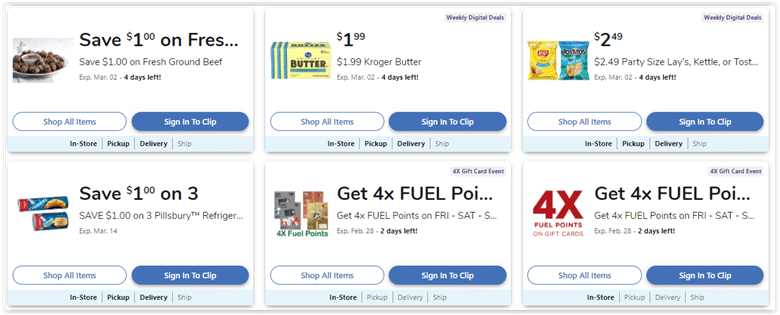
Once you have a digital account and your Shopper’s Card linked to it, you can take advantage of the many digital coupons regularly available at Smith’s. Viewing the latest digital coupons is easy as the retailer’s official website and app feature a section dedicated to these deals.
Advertisement:
You can use different filters to further improve your search and see if the items of interest are paired with a digital coupon. Once you’ve found the ones you’d like to add to your Shopper’s Card, all you have to do is clip them using the dedicated button at the bottom of each coupon.
The coupons should be available as soon as you load the offers to your Shopper’s Card. Sometimes, connectivity or network issues may prevent the coupon from loading. If that’s the case, try again later when you have a stable Internet connection.
To see the expiration date of a digital coupon, check the details provided with every offer. Such an option is featured at the bottom of each coupon.
If you want to remove a digital coupon you’ve loaded to your card, go to the “Digital Coupons” section, “My Coupons” tab. You should then see the “Remove from Card” option at the bottom of each coupon.
To redeem the coupons you’ve loaded to your card, all you have to do is purchase the products you need and the discount will be redeemed automatically at checkout. Keep in mind that when you shop in-store, you will have to scan your Shopper’s Card or enter your Alt ID at the register. The discount applied should appear on your receipt under the qualifying product and should be identified as “ecpn.”
Digital Coupon Limits
Using digital coupons will help your savings add up, and as we’ve seen, redeeming them is easy and straightforward. However, there are a few limits when it comes to using coupons at Smith’s, including digital ones. That’s why it is best to read the coupon policy carefully to make sure that you get the most out of your shopping sessions at this retailer.
For example, you can load up to 150 digital coupons at a time, and certain coupons that are valid for a longer time, sometimes even a few months, can count as more than one coupon.
At the time of writing, the digital coupon section featured 242 coupons, which means that it is likely for you to find something of interest. Moreover, digital coupons cover a wide selection of products so that every shopper can find items that meet their needs at lower prices.
To cover the needs and preferences of all its customers, Smith’s also allows shoppers to print digital coupons. If you’re interested in doing so, just log in and go to the Digital Coupons page. Once you’re there, you should see the My Coupons tab. Click on this tab and then click the “Print My Coupons ” button to print the digital coupons you’ve selected.
Advertisement:
What’s also worth noting is that according to the retailer’s website, you can use your digital coupons at any Kroger family of stores as long as the item is in stock.